"YouTube's Create app, which it launched last year in selected markets, is a free video editing tool, which provides access to a range of functions that make it easier to formulate more complex video clips. And now, Android users of Create will be able to access Google's most advanced AI video creation tools in stream, which YouTube says could be especially helpful for generating shots that you didn't get."
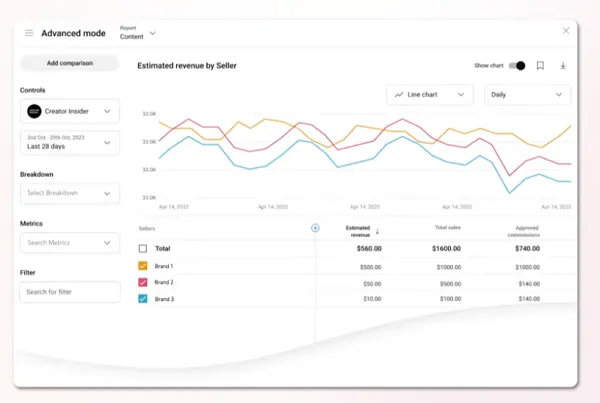
"YouTube Create also has an " Edit with AI" feature, which can create videos from your raw footage, including music and effects. "Creators can find this info by going to YouTube Studio Analytics, then 'Advanced Mode,' then selecting 'Seller' under breakdown. Creators will be able to see things like total sales, orders, returned products, and more." Finally, YouTube's also provided some notes on its latest additions to the Inspiration tab, which now provides more prompts for your content."
""We've added more control to the visual experience here. By clicking on the 'Settings' icon, you can now set your image preferences to view ideas in digital painting or sketch style, or disable images entirely if you prefer to leave it to your imagination. And don't worry about losing your train of thought. You can now use the back and forward arrows on the feed to navigate between your iterations.""
YouTube Create on Android now integrates Google's Veo 3 Fast model to support Shorts-focused video editing and added AI-driven video generation. The Create app remains a free editing tool providing functions to compose more complex clips and now streams advanced AI tools to help generate missed shots. The " Edit with AI" feature can assemble videos from raw footage, applying music and effects automatically. Seller-level analytics are accessible via YouTube Studio Analytics > Advanced Mode > Seller, showing sales, orders, and returns metrics. The Inspiration tab offers more prompts, adjustable image style preferences, navigation between iterations, and data-driven insights like audience interest and view-prediction signals.
Read at Social Media Today
Unable to calculate read time
Collection
[
|
...
]