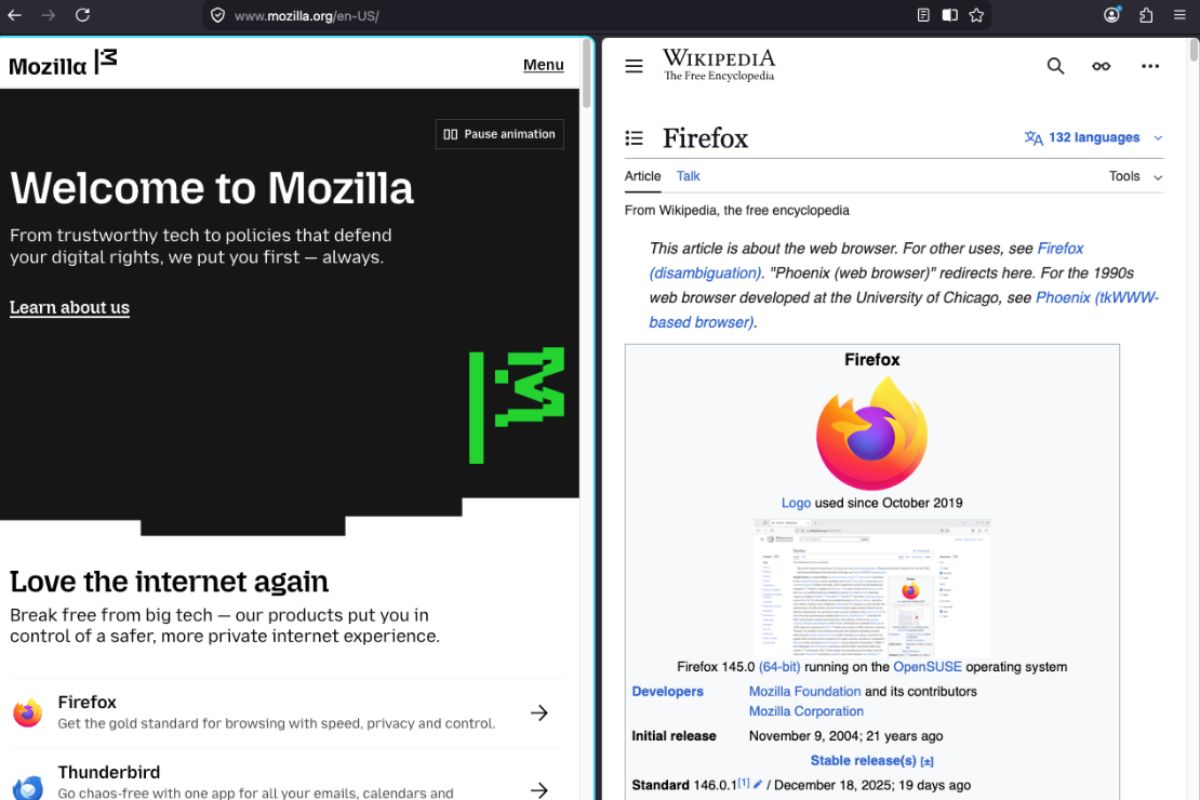
"The implementation is straightforward for those running the latest Nightly version. Users can jump into the action by right-clicking an active tab or selecting two tabs at once. According to the official Firefox Nightly News report: "You can right click on a tab to add it to a split view, and from there select the other tab you'd like to view in the split. Or, multi-select 2 tabs with Ctrl/Cmd, and choose 'Open in Split View' from the tab context menu.""
"Alongside Split View, Mozilla has also enabled Tab Notes in Firefox Nightly. This feature lets users attach short notes to individual tabs, which can be viewed by hovering over them. The idea is to help users remember why a tab is open, especially for those who keep many tabs running for long periods. Mozilla says Tab Notes are still a work in progress, and more improvements are expected before the feature moves beyond testing."
Firefox Nightly now enables a Split View feature by default that places two websites side-by-side within a single browser window. Users can activate Split View by right‑clicking a tab or multi‑selecting two tabs and choosing Open in Split View. The split window presents two independent scrollable panes while sharing the main toolbar and address bar, plus a draggable divider to prioritize one side. Nightly also adds Tab Notes, allowing short notes to be attached to individual tabs and viewed on hover to help recall why tabs remain open. Tab Notes remain under development. A new browser.aiwindow.enabled option is present for testers to open a separate AI Window, and current AI chat tools require a Mozilla account sign-in and remain in early development.
Read at TechRepublic
Unable to calculate read time
Collection
[
|
...
]